
Alibaba Cloud, also known as Aliyun, is the cloud computing arm of the Alibaba Group, one of the largest e-commerce and technology conglomerates in the world. Founded in 2009, Alibaba Cloud has rapidly grown to become the leading cloud provider in China and a significant player globally. It offers an extensive range of cloud computing services, similar to other cloud giants like AWS, Azure, and Google Cloud. This guide aims to provide an overview of Alibaba Cloud’s features, historical context, and a step-by-step technical guide for beginners.
Alibaba Cloud was launched to support the internal infrastructure of Alibaba Group’s booming e-commerce business, but it quickly expanded its operations. Now, it serves customers globally, providing computing power, database services, and other cloud-related functionalities. In less than a decade, Alibaba Cloud has become the largest cloud provider in China and the fourth largest globally, as per market share statistics.
Alibaba Cloud provides a variety of computing resources, including Elastic Compute Service (ECS), containers, and serverless computing capabilities.
Services like Object Storage Service (OSS), Table Store, and Alibaba Cloud’s proprietary relational database service RDS are available for a variety of storage needs.
Alibaba Cloud offers Virtual Private Cloud (VPC), Content Delivery Network (CDN), and other networking solutions to ensure fast and secure data transfer.
With services like MaxCompute and Machine Learning Platform for AI, Alibaba Cloud is geared towards big data analytics and artificial intelligence applications.
Alibaba Cloud provides robust security measures, including Anti-DDoS protection, Web Application Firewall (WAF), and data encryption services.
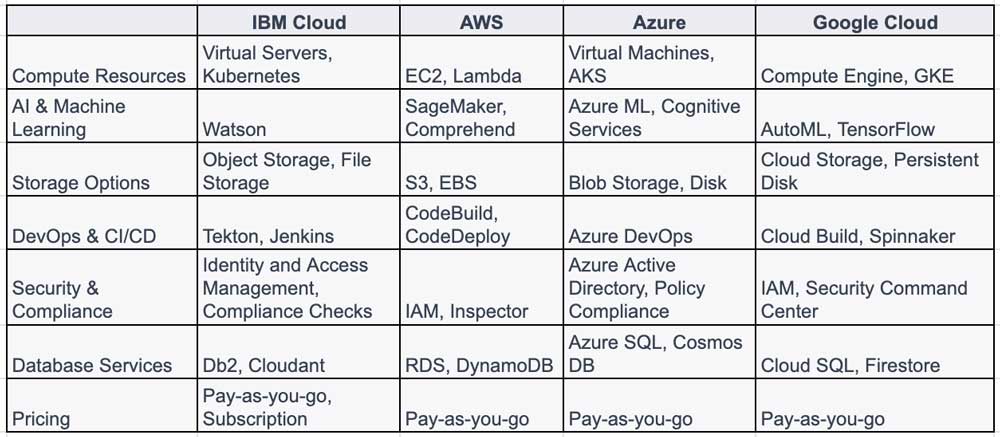
There are several other cloud hosting providers that compare to Alibaba Cloud, including Amazon AWS, Microsoft Azure, and Google Cloud.
The chart below compares Alibaba Cloud to each of these alternative cloud providers.
1: Log in to Alibaba Cloud: Use the Alibaba Cloud Console or the CLI to log in.
aliyun configureFollow the prompts to enter your Access Key ID and Secret.
2. Create an ECS Instance:
aliyun ecs CreateInstance --Region <Your-Region>Replace <Your-Region> with the appropriate region.
3: Connect to the ECS Instance: Use SSH to connect to your new ECS instance.
ssh root@<ECS-IP-Address>4: Deploy Your Web App: Upload your web app files to the ECS instance and configure your web server to serve the application.
5: Access Your Web App: Once the web app is deployed, it should be accessible via the public IP address of the ECS instance.
6: Monitor and Manage: You can use the Alibaba Cloud Console to monitor resource usage, set up alerts, and manage your application further.
Alibaba Cloud has firmly established itself as a global player in the cloud computing market, offering a wide range of services from elastic computing to big data analytics. Its strengths in security and regional coverage, especially in China, make it a compelling choice for enterprises and developers alike.